
Build a Business That Runs Without You: 4 Practical Ways to Document Your Processes

Updated: Aug 10
Business processes often get a bad rap. They sound like a huge amount of work and just the thought of them makes you sleepy! But in reality, documenting business processes can make the difference between someone who is running themselves ragged managing everything (even when they might have a team) and a scalable business owner. Whether you're a team of one or ten, documenting how you work is the only way to stop reinventing the wheel every Monday morning.
When your processes are clear, you don't just work faster, you gain the freedom to recruit, train, and eventually step away, knowing the quality of your service won't drop.
Here is how to move from "it's all in my head" to a streamlined operation.
You should have key processes for each area of your business even if it’s only you managing your business now.
Here are some examples that are relevant for small businesses:

Where to start - the big picture
Before diving into the weeds, you need a map.
This is an excellent place to start as the flow chart maps your customer’s journey from seeing your marketing material all the way through to the final invoice (and glowing testimonial!).
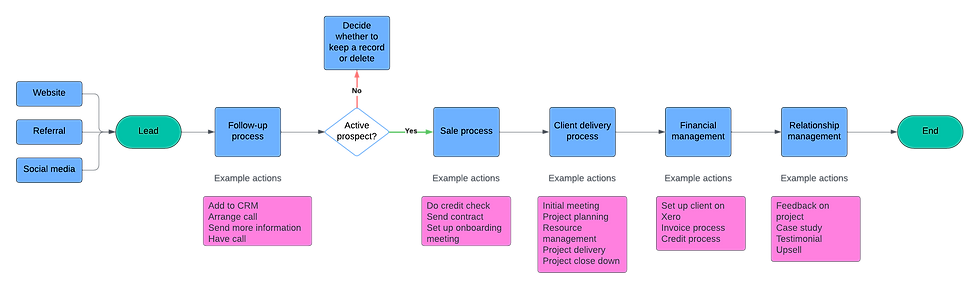
Think about your main service offering and the process a customer goes through with you under the main headings in the diagram above.
Map the journey - Use a whiteboard, flipchart or a digital tool like Lucidchart to visualise every step. In the good old days, we used to stick brown paper on the walls and use post-it notes (this still works and allows you to move things around).
For each of these steps identify:
Who does the work
How they do it
What tools they use (is it all manual or do you have a CRM for example to support the process?)
What they do next
Spotting the Gaps - Look for bottlenecks where things get stuck (usually at your desk!) and identify which tools, like a CRM, could support the flow
Stop press! David Jenyns - systems guru and author of the highly recommended SYSTEMology has created a free AI tool that helps you create this journey. He calls it the Critical Client Flow (CCF). He has kindly allowed me to share it. It will guide you through the flow and then make recommendations to improve and tighten it up. It will save you a lot of time to get your basic flow nailed. I tried it and it was excellent! Try it out here
4 ways to document (and not all of them are painful!)
Fully documented processes or SOPs (Standard Operating Procedure)
These are the ones that typically put people off before they’ve even started because they are time consuming.
The ultimate aim is to have your handbook of how your business works from soup to nuts. If you are hoping to sell, licence or franchise your business at some stage, creating this handbook is vital.
But to start off with, concentrate on the key processes – the ones you do every day, that impact on your customers. The list above in the table is a good starting point.
The benefit of having fully documented processes is that it means you can hire others to do aspects of your role. And they make the basis of your training programme whether it’s training new people or existing people with new skills.
A suggested structure is this:

And here is an example of the start of the process before opening a clinic:

They provide a blow-by-blow account of all the steps to take. It needs to be so detailed that a new employee could follow it without any help.
Videos/audio
These are a fast way to document processes – if a process happens on a screen, don’t write it, document it.
Screen Capture: Use tools like Loom to record the process showing exactly where to click making it easy for someone else to follow along.
They are also great for short processes and quick how tos. Here’s one I sent to a client to show them how to upload pdfs to LinkedIn:

The beauty of these is that you get the transcription and if you use something like Loom with the AI add on, it creates either the SOP or the step by step the process for you, taking all the headache out of it.
It’s then a pretty easy job to add any extra detail (purpose, scope etc.) and make any other small edits and you have a fully formed process or SOP.
Voice Memos: If you're better at talking than typing, record yourself explaining a workflow while you drive or walk. Then it’s easy enough to get it transcribed and use your preferred AI tool (e.g. Gemini or Claude) to convert it to a process.
Checklists
These are great for people who are already know how to do the job but just need to ensure nothing falls through the cracks. I use them all the time – here’s one I used for onboarding associates:

Use Cases: Perfect for complex invoicing, new client onboarding, or pre-flight checks for a webinar.
Reliability: It removes the mental tax of remembering small details, like "Did I add the new associate to the email list?
Automated workflows
Once a process is documented, it’s often ripe for automation. But until you understand the process, it’s more difficult to work out what can be automated.
Tools like Capsule CRM can trigger a client delivery onboarding checklist (track) the moment an opportunity is marked as won. It also improves efficiency, moving the client to the next stage of delivery automatically ensuring a consistent delivery experience for all your clients.

Your 11 step checklist to process mastery
Map it – visualise your main client workflow from end to end.
Identify - the key processes you need to document.
Highlight - the pinch points and bottlenecks.
Record - Use video and voice recording to capture the key processes and tasks.
Transcribe - Use AI to turn those recordings into written drafts.
Refine – Add the ‘why’ and ‘who’ to the drafts.
Test - Give the document/videos to someone else – if they get stuck, something’s missing.
Organise – Create a central Process Folder with clear sub-folders for Marketing, Sales and Finance etc.
Delegate - As you hire, hand over the responsibility for keeping the documents updated.
Review – Set regular review dates to ensure that ‘the way we do things’ still works optimally. Tweak accordingly.
Automate - Once you are happy that your processes are working as they should, look at how you can automate the process.


Comments